
How this tool works
Redact PDF: a practical guide
Renders each page, paints a black rectangle on the selected pages and creates a new PDF using only the resulting images. Source text objects, attachments, form fields and metadata are not copied.
Steps to use this tool
- Select a PDF and list pages to redact.
- Set the rectangle's left, top, width and height.
- Redact and inspect the covered area and text-removal result.
Tested example — 19 October 2026
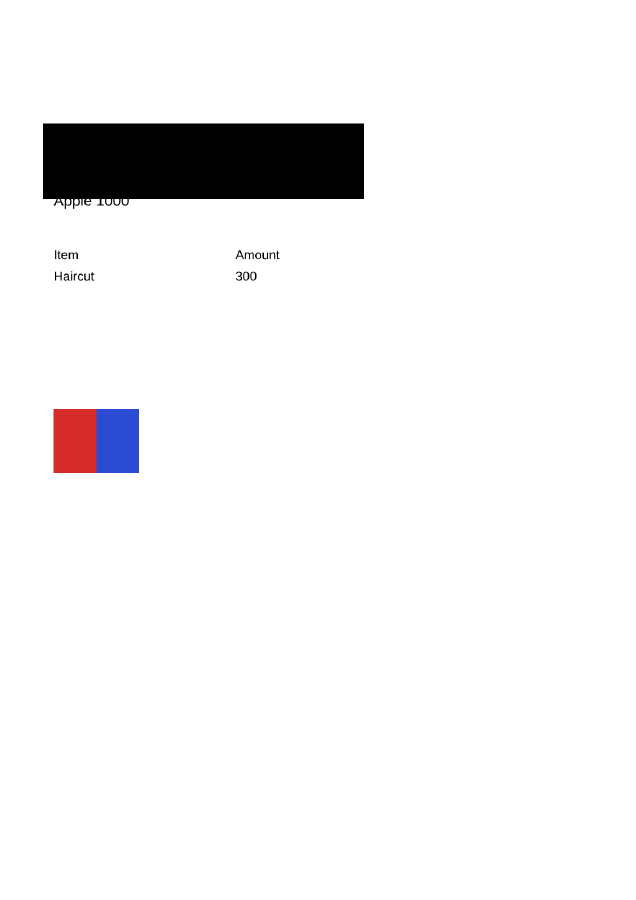
The sample rectangle covers the intended pixels in black and the rebuilt PDF has no extractable source text.
Selected sample: sample.pdf (2421 bytes, 2 pages).
Measured output: sample-redacted.pdf — 28423 bytes; 2 PDF pages.
Sample settings:
{
  "pages": "1",
  "x": 40,
  "y": 115,
  "width": 300,
  "height": 70
}
Test environment: Node + native canvas + actual site-ui.js form integration in LinkeDOM Representative sample; inspect your own output.
Check the result
Zoom into the covered rectangle and check every edge around the sensitive value. Search and copy text from the output to verify that source text objects were not retained.
Files and privacy
The public tool processes selected documents in your browser. It does not send document bytes to a conversion server. The page and its bundled libraries still download from this website. Keep the original, use an up-to-date browser and inspect your output before sharing it. See the privacy policy for hosting and support information.
If processing fails
A rectangle outside the page or an invalid page reference must be corrected. Start from the original for another attempt because the image-only result does not preserve editable text.
Implementation notes and sample evidence updated 2026-10-19. These notes describe the supported operation and its limits.
Check the local-processing claim in your browser’s Network panel.