
How this tool works
Invoice Generator: a practical guide
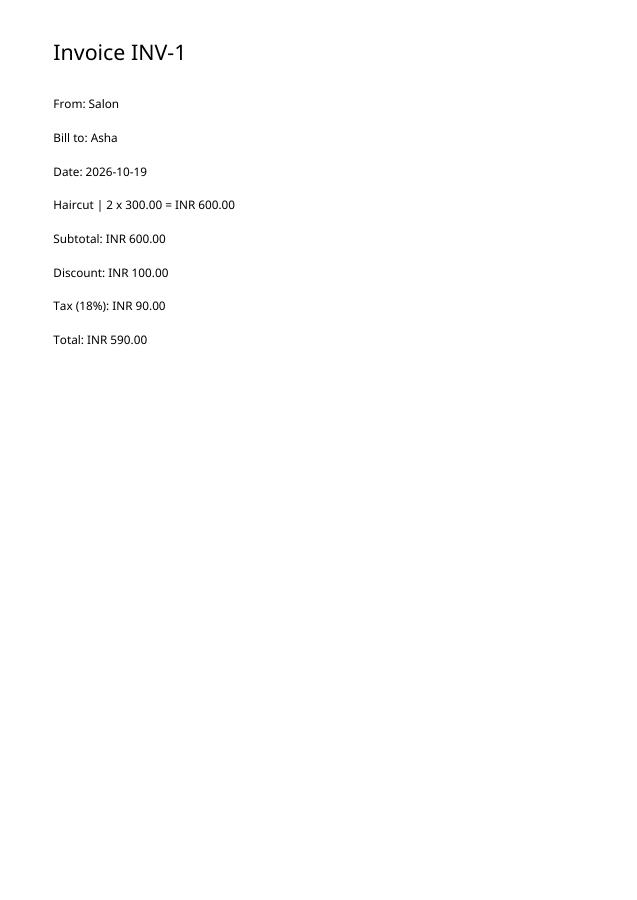
Each line uses description | quantity | unit price. The tool rounds line totals to currency minor units, subtracts the fixed discount, calculates tax on the discounted subtotal and prints the totals.
Steps to use this tool
- Enter seller, customer, invoice identifier and item rows.
- Set currency, fixed discount and tax percentage.
- Generate the invoice and independently check the total.
Tested example — 19 October 2026
Two units at 300, minus a fixed 100 discount, plus 18% tax produce a verified INR 590.00 total.
Measured output: invoice.pdf — 9064 bytes; 1 PDF pages.
Sample settings:
{
  "seller": "Salon",
  "clientName": "Asha",
  "invoiceNumber": "INV-1",
  "currency": "INR",
  "items": "Haircut | 2 | 300",
  "discount": 100,
  "taxRate": 18
}
Test environment: Node + native canvas + actual site-ui.js form integration in LinkeDOM Representative sample; inspect your own output.
Check the result
Recalculate at least one line and the final total independently. Confirm the currency code and customer details before treating the generated document as an invoice.
Files and privacy
The public tool processes selected documents in your browser. It does not send document bytes to a conversion server. The page and its bundled libraries still download from this website. Keep the original, use an up-to-date browser and inspect your output before sharing it. See the privacy policy for hosting and support information.
If processing fails
An empty item list or invalid amount is rejected. Check separators and number formats rather than allowing a missing line to become a zero-value sale.
Implementation notes and sample evidence updated 2026-10-19. These notes describe the supported operation and its limits.
Check the local-processing claim in your browser’s Network panel.